IDPhotoSize
محرر صور الهوية الرسمي — مجاني، فوري وخاص. صورتك لا تغادر جهازك أبدًا.
Give your photo the identity it deserves!
Private Photo Resizing — 100% On Your Device
This tool processes your photo entirely on your device. Nothing is uploaded to any server, no account is required, and your photo is never transmitted or stored anywhere. All cropping, resizing, background removal, and compression happen locally — completely private.
اختر حجم الصورة
أسقط صورتك هنا
أو انقر للتصفح — JPG، PNG، WEBP
صورتك تبقى على جهازك
Related Tools
Photo Requirements
- 100% client-side — your photo is never uploaded to any server
- No account or sign-up required
- Works offline after the first load (installable as a PWA)
- Supports JPEG, PNG, and WEBP output
- Background removal AI model also runs locally on your device
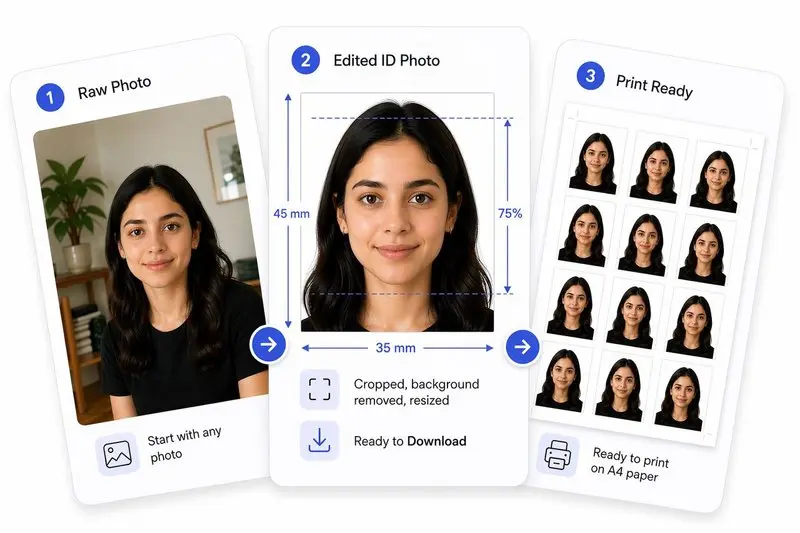
صورتك، مكتملة بشكل صحيح
جهّز صورتك في 3 خطوات
ارفع صورتك
ارفع أي صورة — سنكشف وجهك تلقائياً.
اضبط بنقرة واحدة (أو بتحكم كامل)
استخدم Auto Ready لتوسيط الوجه وتسويته واقتصاصه وتنظيف الخلفية بسرعة. تفضل التحكم بنفسك؟ اضبط كل شيء بحرية في أي وقت.
حمّل واستخدم في أي مكان
حمّل صورتك للاستخدام الرقمي، أو رتّبها على ورقة للطباعة بسهولة.
How to Use This Tool
- Upload your photo — it stays entirely on your device.
- Select your target size from 30+ presets, or enter custom dimensions.
- Crop, center your face, and straighten.
- Optionally remove the background — the AI model runs locally, nothing is sent out.
- Check the Photo Analysis panel — all analysis runs entirely on your device, flagging eye openness, expression, and head position with corrective hints.
- Download your photo — nothing was ever uploaded.
Frequently Asked Questions
- Does my photo get uploaded to a server?
- No. Your photo never leaves your device. All image processing — cropping, resizing, compression, and background removal — runs entirely on your device using Canvas and WebAssembly. Nothing is transmitted to any server.
- Is this tool really free?
- Yes, completely free. No subscription, no account, no watermark.
- Can I use this tool offline?
- Yes. After your first visit the app can be installed as a PWA (Progressive Web App) and used without an internet connection. The background removal AI model is also cached locally after the first use.
- Does the background removal send my photo to an AI service?
- No. Background removal uses a local AI model that runs entirely on your device via WebAssembly. Your photo is never sent to any AI service or cloud server.
- Who can see my photo?
- Nobody. The photo is processed in your browser's memory and is never stored, logged, or transmitted. When you close the tab it is gone.
- What photo sizes can I create?
- The tool supports 30+ official passport, visa, and ID photo sizes — US, UK, EU, India, Singapore, UAE, and more — plus custom dimensions in mm, cm, inches, or pixels.
Need a different size or country?
Open the Full ID Photo Tool — 30+ Sizes